Full List: Upcoming Snapdragon 8 Elite Gen 5-Powered Smartphones in 2025

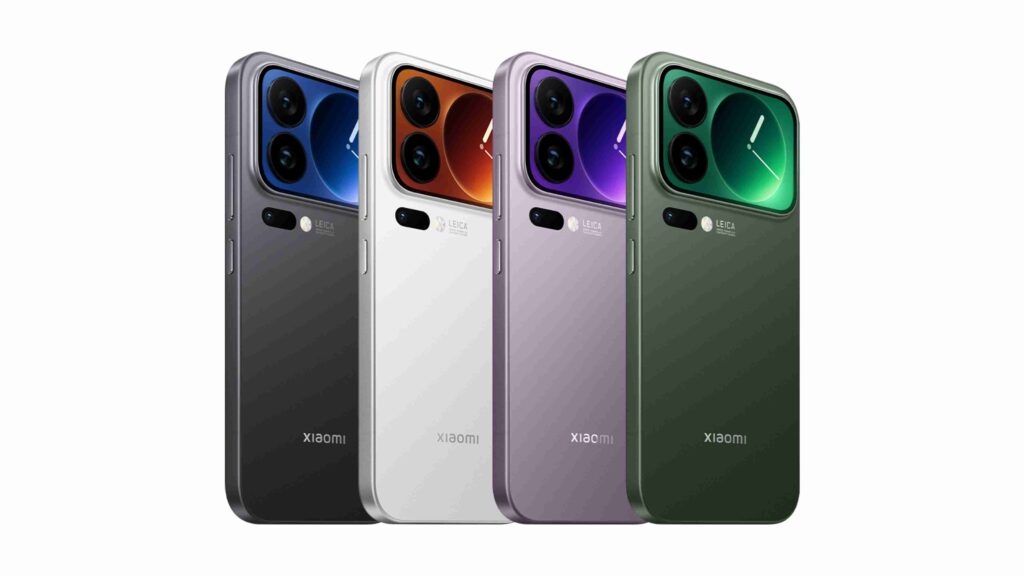
Qualcomm’s Snapdragon 8 Elite Gen 5 is set to power a new wave of flagship smartphones in 2025, promising unmatched AI performance and efficiency. Leading brands like Xiaomi, OnePlus, iQOO, and Samsung are readying their top-tier devices with this cutting-edge chip, here’s every upcoming model to watch. Xiaomi 17 Series Xiaomi’s latest flagship line up the Xiaomi 17 series (which includes the Xiaomi 17, 17 Pro, and 17 Pro Max) was unveiled in China in late September 2025, marking the first phones to ship with Qualcomm’s new Snapdragon 8 Elite Gen 5 chipset. These 3nm-based phones run on Android 16 with Xiaomi’s HyperOS 3, and boast up to 16 GB of RAM and 1 TB of storage. Both Pro models include a futuristic secondary M10 AMOLED display on the back (capable of 3,500 nits peak brightness) for widgets, selfie previews and “Post-it” note reminders. he camera hardware is heavily upgraded: all three 17-series models use a triple 50MP Leica-tuned rear camera setup (LightHunter 950L main sensor, 50MP ultrawide, and 50MP periscope telephoto). The 17 Pro Max stands out with a massive 6.9-inch 2K OLED screen, a very large 7,500 mAh battery (with 100W wired and 50W wireless charging), and a built-in Ultra Wideband (UWB) chip. The smaller 17 Pro uses a 6.3-inch display and a 6,300 mAh battery (also 100W wired charging), while the standard Xiaomi 17 is a compact 6.3-inch, 120Hz phone with a 7,000 mAh battery and wireless charging. All three run Xiaomi’s new “HyperIsland” software feature (similar to a Dynamic Island) and support HyperOS AI tools. These phones represent Xiaomi’s cutting-edge innovations (dual screens, high-speed charging, multi-50MP cameras) around the SD 8 Elite Gen 5. There is no confirmation yet for an India release date, but reports suggest the Xiaomi 17 series could reach global markets including India by late 2025 or early 2026. Related articles: realme Neo 8 Launches With 8,000 mAh Battery and 165 Hz Display iQOO 15 iQOO (Vivo’s performance sub-brand) is set to unveil its new flagship iQOO 15 in China on October 20, 2025, and it will be powered by the Snapdragon 8 Elite Gen 5 processor. The iQOO 15’s design is striking: it features a dynamic colour-shifting back (e.g. its crimson red version shifts to a swirled pattern at angles) and a sleek metallic frame. The display is a giant 6.85-inch Samsung Everest OLED panel with 2K resolution and a fast 144 Hz LTPO refresh rate, boasting up to 6,000 nits peak brightness (2,600 nits full-screen) thanks to Samsung’s new M14 luminescent material. In terms of optics, leaks and teasers hint at a triple 50 MP rear camera array (50MP wide, 50MP ultrawide, 50MP periscope telephoto) an official poster confirms a periscope lens for extended optical zoom. Powering the heavy-duty experience is a 7,000 mAh battery with 100W wired and 50W wireless charging, along with an ultrasonic fingerprint reader and stereo speakers. iQOO has also included a “Q3” dedicated gaming co-processor for sustained performance and a large X-axis haptic motor for feedback. This combination promises top-tier performance (Notebook Check notes iQOO claims it can break 4 million points on AnTuTu) and cutting-edge features. The iQOO 15 is one of the first SD 8 Elite Gen 5 phones to be teased for India; the company is expected to launch it in India around November 2025, following its China debut. iQOO Neo 11 Alongside the flagship, iQOO is preparing a more affordable gaming-oriented model, the iQOO Neo 11. This mid-premium phone is also tipped to carry the Snapdragon 8 Elite Gen 5 chipset. Leaks suggest the Neo 11 will have a flat 6.8-inch 2K OLED display (likely 144 Hz) with an in-display ultrasonic fingerprint sensor, and a refined build with a metal mid-frame and IP68 dust/water protection. Power will come from a giant 7,500 mAh battery and 100W fast charging, while gaming features include iQOO’s “Monster Supercore Engine” for sustained peak performance. The emphasis on long battery life and thermal management (as in past Neo models) is clear. Essentially a “Lite” variant of the iQOO 15, the Neo 11 should retain many high-end traits (fast charging, gaming focus) but in a slightly cheaper package. iQOO is expected to launch the Neo 11 at the same October 20 event in China, and it may reach India (where the Neo series has a following) in the months after, likely in late 2025. Related articles: Xiaomi HyperOS 3.1: New Design, Android 16, and iOS-Style Features Realme GT 8 Pro Realme’s next GT-series flagship is the GT 8 Pro, which was unveiled in China in October 2025 and is now expected to reach India very soon. It is confirmed to use Qualcomm’s Snapdragon 8 Elite Gen 5 platform and will be Realme’s first Gen 5-equipped phone outside China. Realme has been teasing a radical camera design for the GT 8 Pro. Notably, this phone marks Realme’s first major camera collaboration since 2019 – Realme has announced a partnership with Japanese imaging firm Ricoh for this device. Rumors suggest the rear cameras include a 50 MP Sony LYT-700 primary sensor plus an ultra-wide, and a massive 200 MP Samsung HP5 periscope telephoto lens (likely 5× optical zoom). The GT 8 Pro also sports a 2K resolution display (likely 6.7–6.8 inches) with high refresh rate, and a large battery to support the power-hungry chip and camera system. Realme has confirmed India launch plans: sources say the GT 8 Pro is tipped to debut in India around November 10–12, 2025, making it one of the first Indian phones with the SD 8 Elite Gen 5. In summary, the GT 8 Pro combines the new flagship chipset with Realme’s enhanced camera tech (courtesy of Ricoh) and fast-charging battery for the premium segment. OnePlus 15 OnePlus has officially confirmed its next flagship will be called the OnePlus 15, skipping “14” for auspicious reasons. The OnePlus 15 is all but certain to be built around the Snapdragon 8 Elite Gen 5 chip, continuing the brand’s tradition of flagship specs. Leaks and teasers suggest the OnePlus 15 will use a flat 6.78-inch 1.5K
Full List: Upcoming Snapdragon 8 Elite Gen 5-Powered Smartphones in 2025 Read More »