IMDAD

iOS 26.2 update features explained in detail
Apple logo with iOS 26.2 text on a blue glass-style background

Apple’s iOS 26.2 builds on iOS 26.1 with small but useful upgrades. From better reminders to safer AirDrop sharing, this update focuses on polish, security, and everyday features iPhone users actually notice. Overview: iOS 26.1 vs iOS 26.2 iOS 26.1 was a stability-focused update with a few UI tweaks. iOS 26.2 goes further by adding practical features, improving system apps, and fixing security issues. It’s not a redesign, but it makes iPhones feel more complete. Lock Screen and UI Changes One of the most visible updates in iOS 26.2 is better control over the Liquid Glass lock screen style. Users can now adjust how transparent or frosted the clock looks using a slider. In iOS 26.1, this was limited to basic on/off options. Animations across the system also feel slightly smoother, especially in menus and pop-ups. These are small changes, but together they make the interface feel more refined. Reminders Get Alarm Support This is one of the biggest upgrades in iOS 26.2. You can now set Reminders to ring like alarms, not just show notifications. When a reminder is marked urgent, it appears full-screen with sound, snooze options, and lock screen controls. AirDrop Is More Secure iOS 26.2 adds code-based AirDrop sharing. If you’re sending files to someone not in your contacts, a code appears on their phone. The transfer only completes after the code is entered. This makes AirDrop safer in public places. iOS 26.1 did not offer this protection. Apple Music Improvements Apple music lovers get a simple but helpful upgrade: Offline lyrics now work when songs are downloaded. Favorite songs are easier to access from the Music home screen. In iOS 26.1, lyrics required an internet connection. This change is great for travel or low-signal areas. Podcasts App Updates The Podcasts app feels smarter in iOS 26.2: Episodes now get auto-generated chapters Links mentioned in podcasts are easier to open Discovering related shows is simpler Apple News and Daily Use Apple News now includes quick topic buttons like Sports, Business, and Puzzles. This helps users jump directly to what they want instead of scrolling endlessly. Home App and Freeform iOS 26.2 brings useful productivity upgrades, with the Home app allowing multiple smart devices to be set up at once using a single code, and Freeform gaining tables for better planning and note-taking. Accessibility and Alerts The newer update enhances accessibility by adding screen flash alerts for notifications and improving emergency and safety alerts in supported regions, making it easier for users to notice important alerts even if they miss sounds or vibrations. Performance, Bug Fixes, and Security This update focuses on stability and security, delivering important patches and fixing several bugs found in the previous version, including vulnerabilities that could be actively exploited. Performance feels stable overall, with most users experiencing smooth and reliable day-to-day use.

iOS 26.2 update features explained in detail Read More »

Apple TV and Apple Music Services Down for Many Users, Playback Issues Reported

Apple TV logo on a dark background representing a service outage

Apple TV and Apple Music experienced a widespread service outage, preventing many users from streaming shows or listening to music. The outage began without warning, and thousands of complaints poured in as playback issues spread across various regions. A major disruption hit Apple TV and Apple Music services on Thursday evening, affecting users in multiple countries. Reports of streaming failures, buffering, and connection errors quickly surfaced, with many subscribers saying that content wasn’t loading or playing at all. Apple acknowledged the issue on its system status page, confirming that several media services were experiencing problems. While Apple didn’t provide a detailed explanation, it stated that “some users may be experiencing intermittent issues” with Apple TV, Apple Music, and related services. What users experienced For Apple TV users, the most common complaints included shows and movies failing to start, freezing mid-playback, or displaying blank screens. Some users reported being unexpectedly logged out, while others said the app couldn’t connect to Apple’s servers at all. Apple Music users also experienced disruptions, including tracks failing to load, playback delays, and sudden interruptions. While not all subscribers were affected, the sheer number of reports suggested a larger backend issue rather than isolated device problems. Outage confirmed by user reports Outage-tracking platforms registered a rapid surge in complaints shortly after the disruption began. At its peak, thousands of users reported issues in a short period, particularly during peak evening streaming hours. Reports came from users on iPhones, iPads, Apple TV hardware, smart TVs, and web browsers. Many noted that other streaming platforms were working normally, suggesting that Apple’s infrastructure was the likely cause of the problem. Apple’s response so far Apple updated its system status dashboard to reflect the outage but has not issued a public statement explaining the cause. The company has previously refrained from providing detailed information for short-duration service disruptions, instead focusing on restoring functionality as quickly as possible. Apple has not shared an estimated timeline for a full recovery. However, similar outages in the past have typically been resolved within a few hours of being identified. There is no official information regarding the cause of the outage. Experts believe it is likely a server-side or internal system issue affecting both Apple TV and Apple Music, meaning that user-side fixes will not work until Apple resolves the problem on their end.

Apple TV and Apple Music Services Down for Many Users, Playback Issues Reported Read More »

Samsung’s One UI 8.5 Rolls Out With Big Galaxy AI Improvements

showcasing Samsung’s One UI 8.5 with glowing typography and floating app icons on a colorful, futuristic background.

Samsung’s One UI 8.5 update expands Galaxy AI with smarter photo tools, improved sharing features, enhanced security, and smoother system performance. The beta is now live for Galaxy S25 users, offering an early look at the AI upgrades expected to roll out to more Galaxy devices. Galaxy AI in One UI 8.5 gets a major boost with new generative editing tools that let you reshape photos using simple prompts. Photo Assist is smarter, offering continuous edits with full history tracking. You can even merge objects from multiple images, while AI suggestions appear across apps for faster, context-aware actions. The Samsung Gallery app adds an edit-history timeline, new retouching tools and continuous editing so you don’t need to save after every change. Organization is smarter with improved sorting, while enhanced search helps you find photos, edits and albums faster across local and cloud storage. Quick Share gets smarter with AI-based contact suggestions that surface the right people instantly. Storage Share lets you access files across Galaxy devices without manual transfers, and Auracast broadcasting makes it easy to share audio with nearby supported devices for group listening. UI & Design Enhancements UI and design improvements in One UI 8.5 make the experience feel smoother and more polished. You get fresh lockscreen styles with cleaner layouts, faster system animations that reduce visual lag, and a redesigned Quick Settings panel with better toggles and organization. Widgets also load faster and offer more responsive interactions across the home and lockscreen. One UI 8.5 strengthens security with a new Failed Authentication Lock that automatically protects the device after repeated wrong unlock attempts. Enhanced Theft Protection helps secure data if the phone is lost or stolen, while clearer permission controls make it easier to see which apps access sensitive information and adjust settings instantly. The new upgrade boosts overall efficiency with improved RAM management, allowing apps to stay active longer without background drops. Multitasking feels smoother, especially when switching between heavy apps. The updated Battery Care interface offers clearer insights and smarter optimization options, helping extend battery health and daily runtime. The update rolls out first to the Galaxy S25 series, with Fold, Flip, S, and A models to follow. Release timing varies by region and carrier, so both beta access and stable updates will arrive in phases over the coming months. To join the One UI 8.5 beta, open the Samsung Members app, look for the Beta Program banner and register your device. Always back up your data first, since beta builds can introduce bugs or instability. Expect occasional glitches, app crashes and performance issues as features are still being tested. The stable One UI 8.5 update is expected to launch alongside the Galaxy S26 in early 2026, with other Galaxy devices receiving it gradually afterward. Rollout schedules will vary by region, and the final build will include refinements and extra features not fully polished in the current beta.

Samsung’s One UI 8.5 Rolls Out With Big Galaxy AI Improvements Read More »

vivo X300 Pro Price in India and Why It May Break the Premium Segment

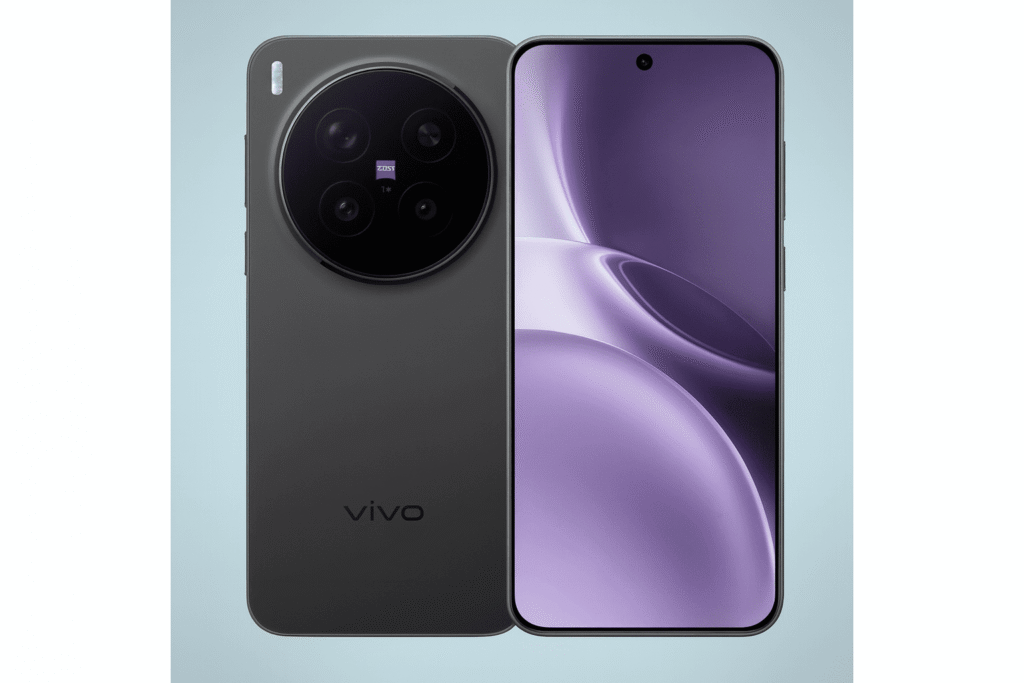
Front and back view of the vivo X300 Pro featuring its ZEISS circular camera module and full-screen display

The Vivo X300 Pro lands in India at ₹1,09,999, instantly staking its claim in the ultra-premium league. With a 200MP telephoto camera, flagship Dimensity power, and a massive 6510mAh battery, it’s built for users who want cutting-edge imaging over compromise. Here’s the full breakdown of what you get for the price. The Vivo X300 Pro is a genuine premium-segment disruptor thanks to its powerhouse Dimensity 9500 chip, ZEISS-tuned triple-camera setup with a standout 200MP telephoto lens, and dedicated imaging hardware that pushes low-light and zoom performance beyond typical flagships. Add a 1.5K LTPO display, IP68/IP69 durability, and a massive 6510mAh battery, and you get a device that challenges rivals not just on specs but on real-world capability. It’s built for users who want pro-grade photography and flagship performance without paying ultra-luxury prices. The camera system gets a major upgrade with a ZEISS-tuned 50MP main sensor, a standout 200MP periscope telephoto, and a sharper 50MP ultra-wide. Improved stabilization, faster processing, and long-range zoom support including the optional ZEISS extender make it a powerhouse for low-light shots, portraits, and distant subjects. Vivo X300 Pro: Power, Design & Battery Powered by a 3nm MediaTek Dimensity 9500 paired with 16GB LPDDR5X and UFS storage, the device delivers flagship CPU/GPU performance with efficient thermals. OriginOS 6’s AI features boost UI responsiveness and multitasking, so both benchmarks and real-world use feel reliably fast and smooth. The design steps into true flagship territory with a sleek 6.78″ flat LTPO AMOLED display, ultra-slim bezels, and premium materials. IP68/IP69 protection, refined color finishes, and a well-integrated camera module give it a polished, high-end feel, while the textured back improves grip and everyday durability. The 6.78″ 1.5K LTPO AMOLED display delivers a sharp 2800×1260 resolution, adaptive 1–120Hz refresh rate, and an impressive 4500-nit peak brightness for clear outdoor visibility. HDR10+ support and wide P3 color coverage make visuals vibrant and accurate, while high-frequency dimming and optimized refresh handling improve comfort and battery efficiency. Overall, it’s brighter, smoother, and noticeably sharper than previous generations. A massive 6510mAh battery paired with 90W wired FlashCharge (40 minutes to full), 40W wireless charging, and reverse wireless delivers class-leading endurance and quick top-ups. While a few rivals offer faster charging, this combo of huge capacity and solid wired/wireless speeds outlasts many mainstream flagships in real-world use. Vivo X300 Pro: Power, Design & Battery Vivo X300 Pro competes strongly with Samsung, Xiaomi, and OnePlus with its strong camera setup and long battery life. The 200MP zoom camera and big 6510mAh battery give it an edge. But Samsung, Xiaomi, and OnePlus phones usually offer faster chips, slightly better screens, and stronger ecosystems. Vivo X300 Pro — Mobile Comparison V Vivo X300 Pro Quick Comparison Vivo X300 Pro ChipDimensity 9500 (3nm) RAM16GB LPDDR5X Storage512GB UFS Camera50MP main, 200MP periscope Display6.78″ 1.5K LTPO AMOLED Battery6510mAh, 90W wired Camera-first Large battery ZEISS tuned Best for: photo enthusiasts who need all-day battery. Samsung (flagship) ChipSnapdragon 8 Elite (or Exynos) RAM12–16GB CameraMulti-lens versatile system DisplayTop-tier AMOLED display Battery~5000mAh EdgeDisplay & ecosystem Best display Strong services Best for: display quality and ecosystem features. OnePlus (flagship) ChipSnapdragon Gen 5 RAM8–16GB CameraStrong main sensor + tuning DisplayHigh-refresh AMOLED Battery~4800–5000mAh EdgeSpeed & UI Fast UI Very fast charging Best for: smooth software and raw speed. Xiaomi (flagship) ChipSnapdragon Gen 5 (varies) RAM8–16GB CameraHigh-res sensors DisplayHigh-res AMOLED Battery~5000mAh EdgeValue & fast hardware Great value Strong specs Best for: value-conscious buyers who want top hardware. Quick Comparison FocusVivo: Camera & battery SamsungDisplay & ecosystem OnePlusSpeed & UI XiaomiValue & specs Jump to Vivo Jump to Samsung Note: Specs vary by model/region. This mobile-first layout uses dark-black text for readability on small screens.

vivo X300 Pro Price in India and Why It May Break the Premium Segment Read More »

iOS 26.2: Liquid Glass Tweaks, Podcast Upgrades, Safety Alerts and the New Apple News, Everything Explained

iOS 26.2 logo on a colorful gradient background

iOS 26.2 isn’t a big redesign, but a bunch of simple updates that make your iPhone feel smoother. Small fixes, better menus, and useful new options, all aimed at making daily use easier and nicer.  iOS 26.2: Quick Highlights UI polish with expanded Liquid Glass touches and a Lock Screen transparency slider. Podcasts get automatic chapters and smarter in-episode links. Safety alerts are clearer and more actionable. Apple News gets a usability refresh with a dedicated Following tab. A handful of quality-of-life updates: AirDrop one-time codes, improved Reminders alarms, CarPlay widget tweaks, and stability/security patches. Apple adds finer Liquid Glass controls in iOS 26.2, including a new Lock Screen transparency slider and smoother animations. More system apps now use the updated translucent look, making the interface feel lighter and cleaner while giving users better control over their Lock Screen style. iOS 26.2 upgrades Podcasts with auto-generated chapters made from episode transcripts, so even long shows get clean sections without creators doing extra work. It also adds smart transcript links that highlight episodes mentioned in the show. Together, these updates make navigation easier and boost discovery for listeners and creators.  This update improves emergency and public-safety alerts with clearer, more direct messages for events like storms or earthquakes, making instructions easier to understand instantly. Alerts now animate more smoothly too, reducing disruption and helping users react faster when it actually matters. iOS 26.2 brings a small but useful refresh to Apple News. The app now gets quicker navigation, a dedicated Following tab, and a clearer layout that feels more curated than chaotic. For anyone using it as a daily briefing, these changes make it faster to find good stories with less noise. AirDrop gets a smarter, safer upgrade with a new one-time code system that lets you share files with people outside your contacts without opening access to everyone. Once paired, both devices can exchange files for up to 30 days, and you can manage or remove these temporary connections in Settings. It’s a practical balance of convenience and security. Other practical upgrades worth noting AirDrop security: one-time codes/PINs for ad-hoc transfers to non-contacts. Handy for events and temporary sharing. Reminders: urgent toggles that can trigger alarm-style reminders for crucial tasks. Sleep & Health: incremental sleep scoring improvements for better nightly metrics. CarPlay: more widget options and the ability to manage pinned Messages from the CarPlay UI. Stability & security: the usual collection of under-the-hood patches and performance fixes that keep the platform tight. Rollout & who should update iOS 26.2 went through several release candidate versions in December 2025 and was close to launching for everyone. If you depend on your device for stable work or often use features like CarPlay or AirDrop in busy places, it’s a good update to install once the final version arrives. Developers and people with older devices should still review compatibility notes and back up before updating.

iOS 26.2: Liquid Glass Tweaks, Podcast Upgrades, Safety Alerts and the New Apple News, Everything Explained Read More »

HONOR Magic 8 Lite: Hardware Overview and Feature Summary

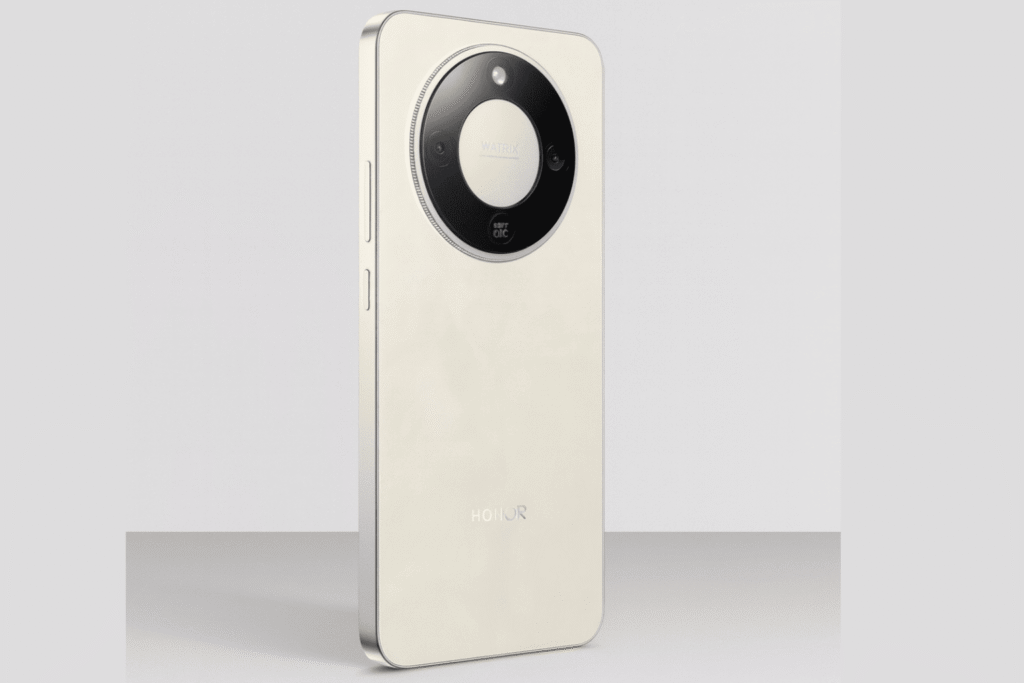
honor magic 8 lite Image in White-Cream Colour

HONOR Magic 8 Lite focuses on practicality over looks: a big-battery, durable mid-range phone that prioritizes multi-day battery life, a bright OLED screen, and solid everyday performance, not flagship camera capabilities or extreme gaming. HONOR Magic 8 Lite: Key Highlights 7,500 mAh battery for long, multi-day use 6.79-inch 120 Hz OLED with sharp, smooth visuals Snapdragon 6 Gen 4 for reliable daily performance Durable, water-resistant build for everyday wear and tear HONOR Magic 8 Lite: Key Highlights Design & build The HONOR Magic 8 Lite features a slim, practical design with a large 6.79-inch form factor that stays comfortable in hand. Despite the big battery, it remains well balanced, using a reinforced frame and water- and dust-resistant build for improved durability in everyday use. Performance Powered by the Snapdragon 6 Gen 4, the HONOR Magic 8 Lite delivers smooth performance for everyday tasks like browsing, streaming, messaging, and multitasking. Apps load quickly and the interface stays responsive, though it’s not designed for heavy gaming or sustained high-performance workloads. Battery & charging The HONOR Magic 8 Lite packs a massive 7,500 mAh battery, delivering reliable multi-day usage on a single charge. It supports 66 W fast wired charging, allowing quick top-ups when needed, though wireless charging is not included. Cameras The HONOR Magic 8 Lite features a 108 MP main camera that captures sharp, detailed photos in good lighting, supported by AI enhancements. A secondary ultra-wide sensor handles group shots, while the 16 MP front camera delivers clear selfies and video calls. 108 MP primary camera for detailed daylight photography Ultra-wide secondary lens for wider scenes and group shots AI camera features for scene optimisation and image enhancement 16 MP front camera for selfies and video calls Display The phone features a large 6.79-inch OLED display with a smooth 120 Hz refresh rate, delivering sharp visuals and fluid scrolling. High brightness levels improve outdoor visibility, while eye-comfort features help reduce strain during long viewing sessions. Software & connectivity The HONOR Magic 8 Lite runs on MagicOS 9 based on Android 16, offering a clean interface with useful AI features and system optimisations for smooth daily use. Connectivity options include 5G support, Wi-Fi, Bluetooth, NFC, USB-C, and dual-SIM support, covering all modern usage needs. Durability Built with durability in mind, the phone features a reinforced frame along with water- and dust-resistance to handle everyday splashes and rough use. The sturdy construction adds confidence for long-term daily use, especially for users who travel frequently or use their phone in demanding environments. HONOR Magic 8 Lite: Strengths & trade-offs Strong battery life, a bright 120 Hz OLED display, and a durable build stand out as key strengths, making the phone reliable for everyday use. On the trade-off side, performance is tuned more for efficiency than heavy gaming, and the camera system prioritises the main sensor over advanced photography features. Honor Magic 8 Lite Display 6.79-inch OLED, 120Hz Processor Snapdragon 6 Gen 4 Battery 7,500mAh Charging 66W Fast Charging Main Camera 108MP + Ultra-wide Front Camera 16MP Software MagicOS9 (Android16) Connectivity 5G, Wi-Fi, NFC

HONOR Magic 8 Lite: Hardware Overview and Feature Summary Read More »

POCO C85 Debuts at ₹11,999, Bringing a 120Hz Display and Helio G81-Ultra

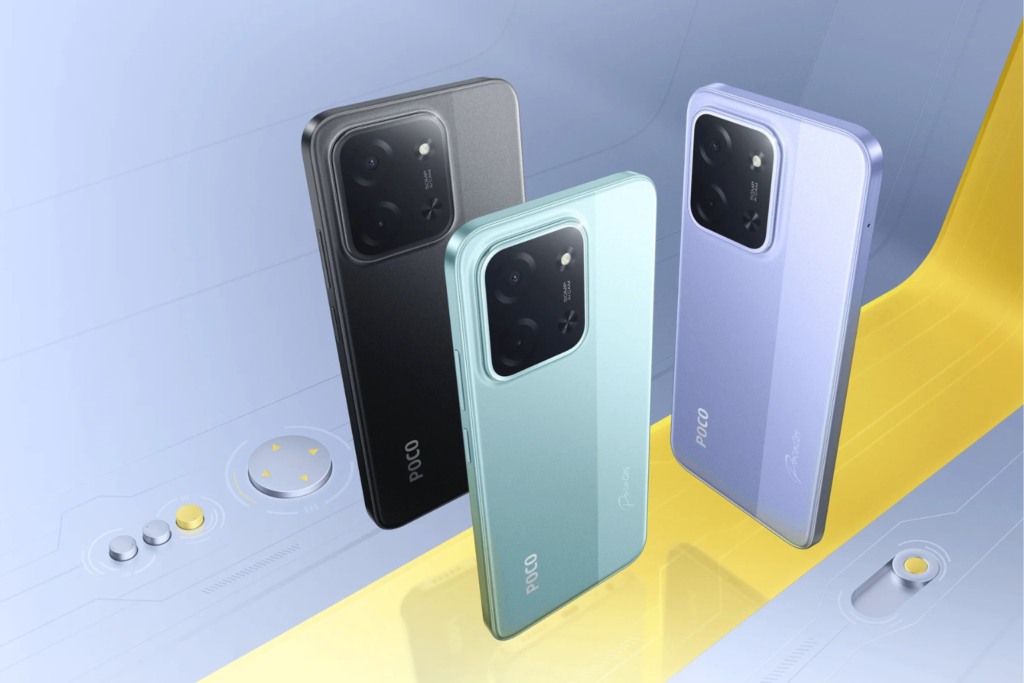
POCO C85 All the available colours

POCO C85 is positioned as a budget-focused smartphone under ₹15K, highlighting a large battery and a smooth 120Hz display. Starting at ₹11,999, it targets users who want fluid performance and all-day battery life without spending more. POCO C85 – Key Specifications Display: 6.9" HD+ LCD, 120Hz refresh rate Processor: MediaTek Helio G81-Ultra RAM & Storage: Up to 8GB RAM, 128GB storage, microSD support Rear Camera: 50MP main camera Front Camera: 8MP selfie camera Battery: 6000mAh, 33W fast charging Software: HyperOS based on Android Price in India: Starts at ₹11,999 (4GB + 128GB) 120Hz Display and MediaTek Helio G81-Ultra Power POCO C85’s Core Experience Talking about the display POCO C85 sports a 6.9-inch HD+ LCD with an adaptive 120Hz refresh rate, up to 240Hz touch sampling, and TUV eye-care certifications. Reaching around 660 nits of brightness, the display balances smooth performance, outdoor readability, and battery efficiency. This phone comes with MediaTek’s Helio G81-Ultra octa-core chipset with a Mali-G52 GPU, aiming at smooth everyday performance rather than high-end gaming. It’s paired with LPDDR4X RAM, eMMC 5.1 storage, and includes microSD expansion, with POCO officially confirming the Helio G81-Ultra despite some brief retail listing confusion. On the back a 50MP rear sensor and an 8MP front camera, focused on daylight shots and casual use. Video is capped at 1080p, making it suitable for social media and everyday photography rather than advanced low-light or multi-camera performance. The POCO C85 stands out for battery life with a 6,000mAh battery and 33W fast charging, focused on long-term endurance rather than speed. It also includes practical extras like a side-mounted fingerprint scanner, 3.5mm headphone jack, IP64-rated splash resistance, and optional NFC depending on the market. Let’s talk software, The POCO C85 runs Xiaomi’s HyperOS 2 based on Android, with features varying by region. It supports 4G connectivity in India and includes essentials like dual-SIM support, Wi-Fi 5, Bluetooth 5.4, and a USB-C port. POCO C85 will be sold in India in three variants 4GB/128GB at ₹11,999, 6GB/128GB at ₹12,999, and 8GB/128GB at ₹14,499 with sales starting on December 16, 2025. Launch offers may lower the effective price, and the phone will be available in Power Black, Spring Green, and Mystic Purple colour options.

POCO C85 Debuts at ₹11,999, Bringing a 120Hz Display and Helio G81-Ultra Read More »

Inside vivo X300’s Camera Strategy: Stability Over Megapixels

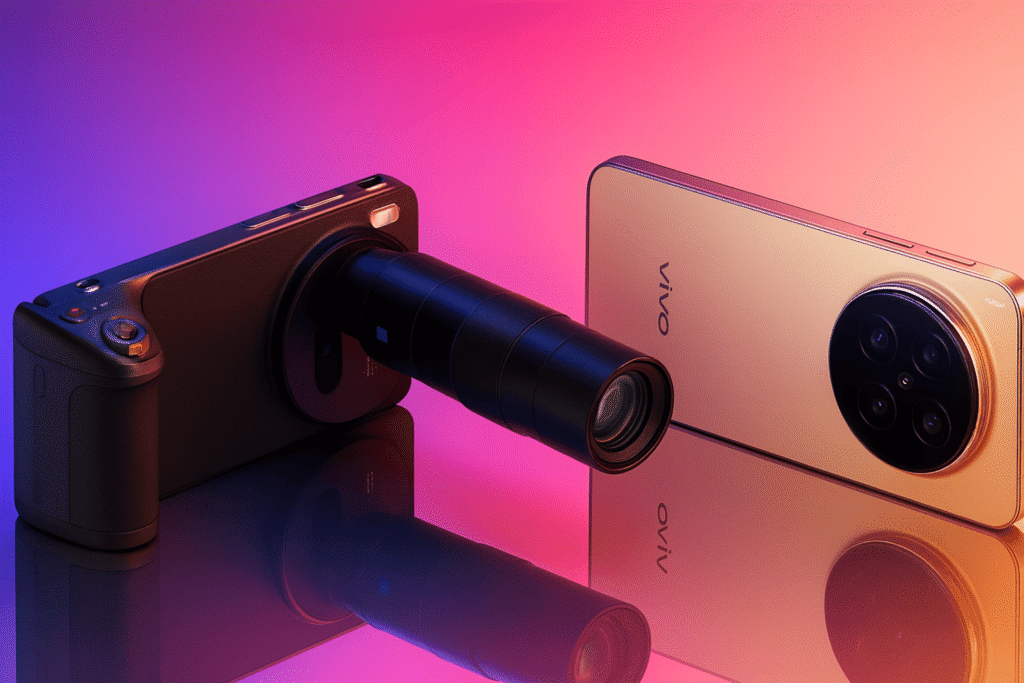
vivo X300 series phones with ZEISS camera system on a glossy mirrored background.

The vivo X300’s biggest camera upgrade isn’t obvious on a spec sheet. A single internal change reshapes how the phone shoots at night, zooms at a distance, and competes with top camera flagships and most people won’t notice it at first glance. The vivo X300’s camera shift isn’t about headline specs but a smart reallocation of sensors: the regular X300 keeps a 200MP main camera, while the Pro uses a stabilized 50MP Sony sensor as its primary and moves the 200MP sensor to the periscope telephoto prioritising steadier, more practical zoom and low-light photography over pure megapixel bragging. On the Pro, a stabilized 50MP Sony main sensor delivers steadier, cleaner low-light and motion shots through OIS and vivo’s image processing, while a 200MP telephoto boosts zoom detail with less digital loss. Together, this creates two camera approaches: one focused on raw main-camera resolution, the other on stable everyday photos and sharper practical zoom. Both X300 models follow a flagship formula: AMOLED displays with HDR tuning and strong outdoor visibility, premium glass-and-metal builds, and solid water/dust protection. The Pro gets a larger 6.78-inch LTPO panel with adaptive 1–120Hz refresh, while the standard X300 is more compact but similar in quality, with both offering the heft and durability of true flagships. vivo X300 Specifications Display 6.78″ AMOLED · 1.5K · 120Hz Chipset MediaTek Dimensity 9500 Rear Camera 200MP + 50MP + Telephoto Front Camera 50MP Battery ≈ 6040mAh · Fast Charging Software Android 16 (OriginOS) RAM & Storage Up to 16GB · UFS 4.1 vivo X300 vs X300 Pro X300 X300 Pro Display 6.78″ AMOLED1.5K · 120Hz 6.78″ LTPO AMOLED1.5K · 120Hz Main Camera 200MPWide Sensor 50MP Sony LYT-828Gimbal OIS Telephoto 50MPPeriscope 200MP ZEISS APOPeriscope Front Camera 32MP 50MP Battery ~6040mAh ~6510mAh Charging 90W Wired 90W Wired + Wireless Chipset MediaTek Dimensity 9500 Performance, Power, and Pricing: Where the vivo X300 Series Draws Its Real Lines The phones run on the Dimensity 9500 chip with custom imaging enhancements that improve noise control, enable 10-bit video recording, and deliver accurate color profiles. High RAM options and fast UFS 4.1 storage keep performance smooth, making multitasking, editing, and daily use feel quick and responsive. The X300 series is built for long use, with big batteries and fast charging that handle extended camera sessions. Both phones support 4K video, slow motion, and 10-bit recording, along with Zeiss camera modes, smart flash, and improved colors, while the Pro also gets a better 50MP front camera for clear selfies and vlogs. Both phones support 4K video, slow motion, and 10-bit recording, along with Zeiss camera modes, smart flash, and improved color tuning, while the Pro adds a better 50MP front camera for selfies and vlogging. The Pro is priced higher due to its upgraded camera setup and larger battery, making it better for users who shoot a lot of zoom or low-light photos, while the standard model suits those who want high-resolution shots in a slightly lighter phone.

Inside vivo X300’s Camera Strategy: Stability Over Megapixels Read More »

Why Europe Needs the Jolla Phone: Breaking the Apple-Google Duopoly

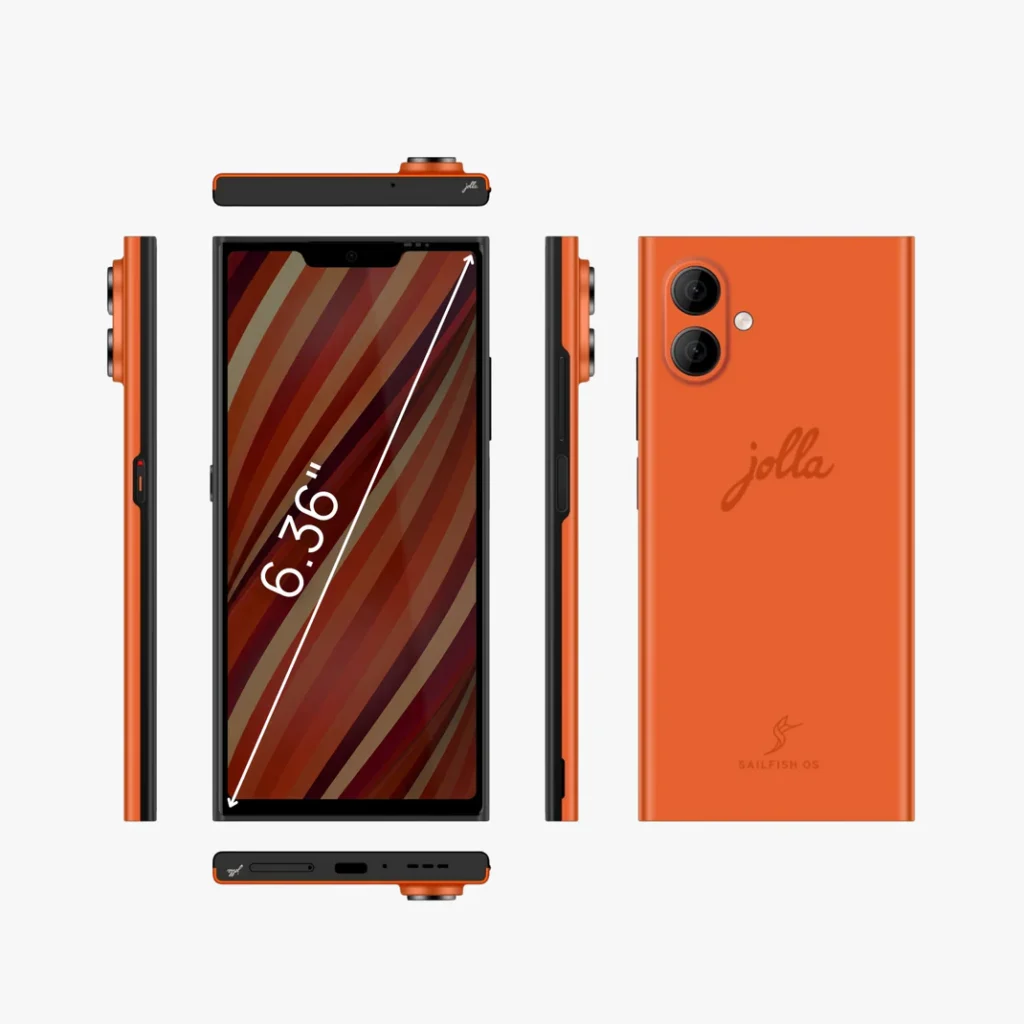
Jolla Phone Image

For more than a decade, Apple’s iOS and Google’s Android have dominated the global smartphone market, shaping an ecosystem where data collection is routine and digital sovereignty outside the U.S. and China is limited. As Europe pushes back through regulation and rising privacy concerns, a homegrown alternative is returning. Jolla’s newly announced, Jolla Phone powered by its privacy-focused Sailfish OS, represents more than another device launch it signals Europe’s growing push to challenge the mobile duopoly and assert control over its digital future. Key Specifications – Jolla Phone Operating System Sailfish OS (Linux-based) Display 6.0-inch Full HD, 90Hz Processor Octa-core with 5G support Memory 8GB RAM, 256GB storage Battery Replaceable, all-day usage Privacy No Google services by default Breaking the Mobile Duopoly in Europe Europe is reshaping its relationship with big tech by taking a global lead in digital regulation and challenging the dominance of major US technology platforms. This shift is driven by laws such as the Digital Markets Act, which aims to open closed ecosystems and promote fair competition, alongside strong enforcement actions like hefty fines against Apple. Similar efforts in the UK, where regulators are moving against entrenched mobile platform power, show a growing determination across Europe to curb gatekeeper control and reduce dependence on walled digital ecosystems. Europe’s push for digital sovereignty is growing as reliance on foreign operating systems is seen as a strategic risk. Jolla’s Sailfish OS, with over a decade in the market, emerges as a rare European alternative, and the new Jolla Phone turns this goal into reality by offering a privacy-focused, user-controlled device built on European values. How Sailfish OS Solves the App Problem Sailfish OS 5 sits at the core of the Jolla Phone, offering a Linux-based alternative built on a decade of development and a fundamentally different philosophy from mainstream platforms. Its defining promise is strict user privacy, with no trackers, background data collection, or Google services, setting it apart from the data-driven ecosystems of Google and, to a large extent, Apple. ChatGPT said: Jolla avoids the common alternative-platform failure by solving the app ecosystem problem through Sailfish OS’s AppSupport, which lets Android apps run on a Linux-based system. This hybrid model delivers access to popular apps while preserving Sailfish’s privacy and security benefits, with the added option for users to disable Android components entirely. Jolla further sets itself apart by promising at least five years of OS support, reinforcing user control and long-term device longevity. How Sailfish OS Solves the App Problem Jolla Sailfish OS vs iOS/Android Feature Description Contrast with iOS/Android Privacy Foundation No trackers, no background data collection, no Google Play Services. Telemetry and advertising IDs are standard. Android App Support Runs Android apps via AppSupport; components can be disabled. Native-only (iOS) or tightly Google-dependent (Android). Software Longevity Minimum 5 years of OS support guaranteed. Roughly 3–5 years for most Android phones; longer on iOS but hardware-tied. Development Model Community-driven “Do It Together” (DIT). Closed, proprietary (Apple) or Google-led (Android). The hardware design emphasises user control and sustainability, rejecting sealed, disposable smartphone trends. With features like a replaceable battery and a physical privacy switch that disables sensors at the hardware level, the Jolla Phone offers strong, reliable privacy. At the same time, modern specifications ensure it remains a capable, well-rounded device built around autonomy and long-term use. The Jolla Phone is being launched through a community-driven pre-order approach that confirms demand before full production. The company has already exceeded its 2,000-unit pre-order target, with early backers able to buy the device for €499, while the final price is expected to settle between €599 and €699, placing it in the mid-to-high segment as a niche, value-focused product. Significant hurdles remain, including the need to scale production, build broader brand recognition, and support a healthy app ecosystem. While the company’s long-term support record demonstrates resilience and commitment, competing in the mainstream smartphone market will require a much higher level of execution.

Why Europe Needs the Jolla Phone: Breaking the Apple-Google Duopoly Read More »

Lenovo Idea Tab Pro Might Be the Tablet Most People Should Buy

Lenovo-Idea-Tab-Pro

Lenovo’s Idea Tab Pro is a 2025 Android tablet built to offer a large, high-resolution display, strong battery life and solid performance at a more accessible price. Positioned as a “pro-lite” alternative, it combines a 12.7-inch 3K screen, Dimensity 8300 chip and a big battery to deliver a near-premium experience, making it a popular pick for users seeking iPad-like usability without the premium cost. Lenovo Idea Tab Pro – Key Specs A quick look at the core hardware of Lenovo’s Idea Tab Pro. Display 12.7-inch 3K LCD, high refresh Processor MediaTek Dimensity 8300 (5G) RAM & Storage Up to 12GB RAM, up to 256GB storage Battery 10,000mAh-class, fast charging OS Android 14 with Lenovo UI Extras Stylus support, keyboard folio (optional) Lenovo Idea Tab Pro in Review: Screen, Performance and Battery Explained The design is clean and understated, with a surprisingly slim 12.7-inch metal build that feels well-made for the price. It doesn’t chase premium flair, but reviewers consistently praise the solid build quality, and the frequent inclusion of the Tab Pen Plus adds meaningful real-world value. If there’s one headline feature, it’s the screen. Multiple reviews call the Idea Tab Pro’s 3K LCD crisp, colourful and notably fluid for the class, with reviewers and buyers pointing to its strong pixel density and high refresh headroom for gaming and scrolling. Audio is tuned with JBL speakers (quad speaker setups on many Lenovo tablets) and the large battery means the tablet is built to be a media companion more than a one-hour demo device. For watchers and gamers who value panel real estate and smoothness but don’t want OLED price tags, this is an attractive option. The Dimensity 8300 sits solidly in the upper midrange, delivering smooth day-to-day performance, capable gaming and reliable media playback without flagship-level costs. Paired with Android 14, Lenovo focuses on practical productivity features like split-screen, multi-window and stylus support, ensuring the hardware feels fast where it actually matters. The 10,200mAh battery is unusually large for this price segment and plays a big role in everyday usability. Reviews suggest it can comfortably deliver a full day of mixed use including streaming, browsing, light gaming and basic productivity while heavier gaming naturally drains it faster. Support for up to 45W fast charging in some markets helps reduce downtime, making it well suited as a portable media screen and digital notepad rather than something that lives near a charger. The camera setup is basic but adequate, with a 13MP rear camera and an 8MP front camera that’s suitable for video calls and online classes. Connectivity covers the essentials like USB-C, Bluetooth and, in some variants, Wi-Fi 6E, with microSD expansion available on select models for added storage flexibility. The Idea Tab Pro is priced to appeal to mass buyers, launching below typical “pro” tablet tiers and often selling for even less through discounts. It undercuts similarly specced rivals sometimes with a bundled pen making it a strong value option for buyers focused on screen quality, battery life and solid performance rather than flagship pricing. Keep in mind regional differences: Lenovo lists different SKUs and bundles by region (US, UK, India, EU), so the included pen, folio and charger wattage can vary; always check the product page for your market How it compares Tablet Comparison Model Display Processor Battery Starting Price* Lenovo Idea Tab Pro 12.7" 3K, High Hz Dimensity 8300 ~10,200mAh Aggressive mid-range Samsung Galaxy Tab S9 FE 10.9" LCD, 90Hz Exynos 1380 8,000mAh Higher than Lenovo Apple iPad (10th Gen) 10.9" LCD, 60Hz A14 Bionic All-day use Premium-tier *Prices vary by region and offers.

Lenovo Idea Tab Pro Might Be the Tablet Most People Should Buy Read More »

At Express Coverage 24, we bring you the latest in technology, gadgets, and digital trends all in one place. From in depth reviews and expert insights to breaking tech news, our goal is to keep you informed and ahead in the fast moving world of innovation. Whether you are a tech enthusiast or just curious about the next big thing, we deliver reliable, easy to read articles that matter.

Content Transparency

At Express Coverage 24, we value honesty, accuracy, and trust. Every article, review, and news update published on our platform is created with thorough research and a commitment to providing reliable information. We do not promote products or technologies without careful evaluation, and whenever opinions are shared, they are clearly marked as such. Our mission is to keep our readers informed with unbiased, fact-based content while being transparent about our sources, partnerships, and review processes.