IMDAD

iQOO Neo 11 Pro India Launch Cancelled? Here’s What We Know

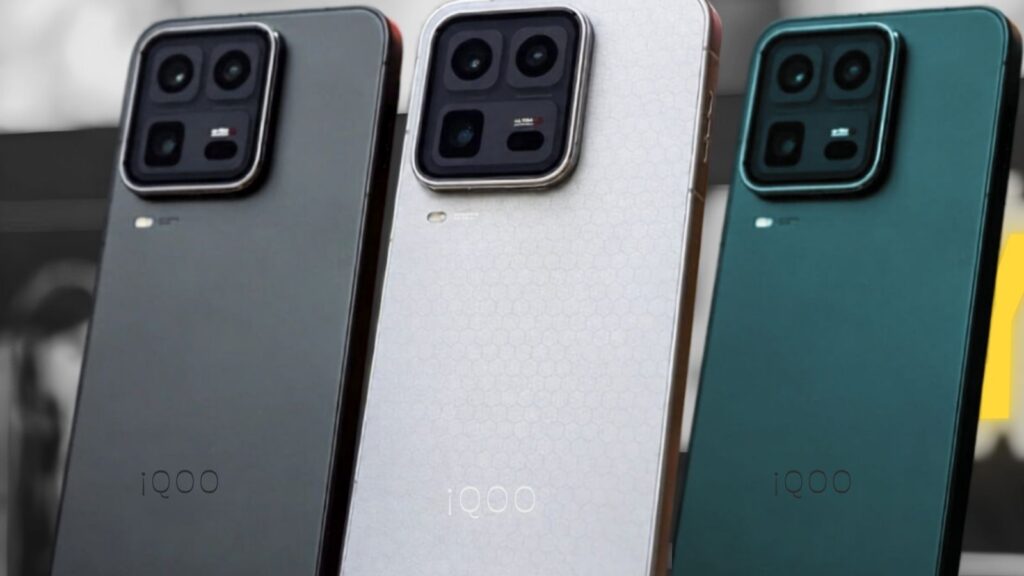
iQOO Neo 11 Pro renders on dark background showing multiple color variants and display design

The iQOO Neo 11 Pro may never make it to Indian consumers. A report from Gadgets360, citing sources with knowledge of the matter, suggests that iQOO is pausing its Neo series launches in India for 2026 entirely. If accurate, this would mark the first time since the series began that Indian buyers go without a new Neo model in a calendar year. iQOO Neo 11 Pro India Launch Status According to a report by Gadgets360, iQOO may not introduce any new Neo series smartphone in India in 2026. If the information proves accurate, the iQOO Neo 11 may not arrive in the country despite its earlier debut in China in October 2025.  The phone was expected to make it to India in March 2026, but the company is likely not going to launch it this year.  As of now, iQOO has not officially confirmed or denied these reports. No India launch date, pricing, or availability details have been announced for the Neo 11 or Neo 11 Pro. Why iQOO May Skip the Neo 11 Pro in India According to 91mobiles, iQOO is looking to streamline its portfolio amid the ongoing memory chip shortage, which has been pushing up device prices. The brand wants to focus on cleaner product differentiation and value proposition, and skipping the Neo series is reportedly part of that move.  The iQOO Z series phones are creeping into the sub-Rs 20,000 territory, while the iQOO 15R is covering the upper mid-range segment. This makes it difficult for iQOO to launch a Neo-branded smartphone that does not collide with its other two phones in pricing.  In short, the Neo 11 Pro risks cannibalizing iQOO’s own lineup rather than filling a gap in it. Also read: Did iOS 26.4 Fix Battery Drain? Early Users Report Big Improvements Expected Specs (Rumored) While an India launch looks uncertain, the Neo 11 Pro has been spotted on Geekbench and 3C certification platforms. Here is what leaks suggest: The Pro variant is expected to be powered by the Dimensity 9500 SoC, run on Android 16, and offer 16GB of RAM. The 3C certification also confirmed 100W fast charging support. Two upcoming iQOO Neo 11 Pro variants are said to feature 6.83-inch 2K LTPS flat displays with ultra-high refresh rates potentially reaching 165Hz, metal middle frames, and 3D ultrasonic fingerprint sensors. Both devices are tipped to pack silicon batteries starting with an “8” capacity figure, likely indicating 8,000mAh or more.  These are China-market specs and may not reflect what would have been offered in India, given that iQOO has historically launched region-specific variants. What Could Launch Instead in India iQOO is not going quiet in 2026. The brand is instead doubling down on two ends of its portfolio. The iQOO 15 is the brand’s current flagship, featuring a Snapdragon 8 Elite chipset, a 7,000mAh battery, and a 2K OLED display, with a launch price of Rs 64,999. The iQOO 15R followed as the sub-flagship option, offering a Snapdragon 8 chip, a 7,600mAh battery, and a 144Hz AMOLED display.  On the budget end, iQOO is also expanding its lineup with the iQOO Z11x, which is expected to target buyers in the sub-Rs 23,000 segment.  For buyers who were eyeing the Neo 11 Pro’s price range, the iQOO 15R is the closest available alternative right now. Should You Wait for iQOO Neo 11 Pro? Based on current reports, waiting for the Neo 11 Pro in India does not appear to be a sound strategy. There is no confirmed India launch, and multiple industry sources point to a full Neo series pause for 2026. The iQOO Neo 10 is already available in India with competitive specifications, and prices for rivals like the OnePlus 15R, POCO F7, and Realme GT 7 may drop further by the time iQOO makes any new announcements. If iQOO does revisit the Neo lineup, it would likely happen in 2027 — potentially as a refreshed or rebranded series. For now, the iQOO 15R and Neo 10 remain the most practical choices for performance-focused buyers in India. Also read: WhatsApp Working on Liquid Glass Voice Note Player + 6 New Features

iQOO Neo 11 Pro India Launch Cancelled? Here’s What We Know Read More »

WhatsApp Working on Liquid Glass Voice Note Player + 6 New Features

WhatsApp Liquid Glass voice note player redesign shown in light and dark mode on iPhone

WhatsApp is rolling out a wave of updates across Android and iOS beta builds. The biggest change this week is a redesigned voice note player with a translucent Liquid Glass interface. Here is everything spotted in the latest WhatsApp beta. Liquid Glass Voice Note Player WhatsApp is testing a redesigned voice note player that adopts Apple’s Liquid Glass design language, first introduced in iOS 26. The new player features a frosted, translucent surface with soft reflections and blurred background elements beneath the playback bar. It replaces the flat, solid-color design currently used in chats. Playback controls, including the waveform scrubber and speed toggle, remain in place but are now wrapped inside the glass-style container. This update has been spotted in the WhatsApp beta for iOS. Chat Filters Get a New “Groups” Tab WhatsApp is adding a dedicated Groups tab inside the Chat Filters bar at the top of the inbox. Users can tap it to instantly view only group conversations, separate from direct messages and unread threads. It is currently live in the WhatsApp beta for Android. Also read: OnePlus Nord CE 6 Lite Design Leak: New ‘Squircle’ Camera and 7,000mAh Battery Revealed HD Photo Sharing Set as Default WhatsApp is testing a change that automatically sends photos in HD quality without requiring users to manually select the option each time. The toggle will still exist, but HD will be pre-selected by default. This is under testing in the Android beta. Voice Chat Indicators in Groups Group chats will soon display a live indicator when a voice chat is active inside the group. The banner appears at the top of the chat thread, allowing members to join directly without navigating to a separate screen. Pinned Messages Get Timestamps WhatsApp is updating the pinned messages panel to display the exact date and time a message was pinned. This makes it easier to track when key information was highlighted in a conversation. The change is spotted in the latest iOS beta build. Status Updates with Link Previews WhatsApp is working on support for link previews inside Status updates. When a user includes a URL in their Status, a preview card with a thumbnail and title will appear automatically. The feature is in early testing on Android beta. Event Reminders Inside Chats WhatsApp is building a native event reminder feature that allows users to create and share event details directly inside a chat. Recipients can save the event without leaving WhatsApp. The feature appears in the latest Android beta and is not yet available to all testers. These features are expected to reach stable builds on Android and iOS over the coming weeks. Also read: Did iOS 26.4 Fix Battery Drain? Early Users Report Big Improvements

WhatsApp Working on Liquid Glass Voice Note Player + 6 New Features Read More »

Did iOS 26.4 Fix Battery Drain? Early Users Report Big Improvements

iOS 26.4 update showing battery life improvements with battery icon and iPhone UI tile

Some iPhone users say iOS 26.4 is delivering noticeably better battery life. Early reports suggest reduced standby drain, improved screen-on time, and lower idle battery loss after installing the update. iOS 26.4 battery improvements reported Since the rollout of iOS 26.4, users across forums and social platforms have reported more stable battery performance. Many mention slower overnight drain and fewer sudden percentage drops during light usage. Early feedback points to improvements in: Standby battery drain Screen-on time during normal use Idle battery drop while not in use Overnight battery loss Reduced background drain Some users also report their iPhones running cooler, which can contribute to improved efficiency. Which iPhones are seeing better battery life Early reports mention improvements across multiple models, including: iPhone 16, 16 Plus, 16 Pro, and 16 Pro Max iPhone 15 and iPhone 15 Pro series iPhone 14 and iPhone 14 Pro series iPhone 13 and iPhone 13 mini iPhone 12 series (mixed results reported) Battery performance varies depending on battery health, usage patterns, and installed apps. Also read: Realme 16 5G Deep Dive: Selfie Mirror, 7000mAh Titan Battery, and IP69K Explained Which iPhones are seeing better battery life While Apple has not detailed battery-specific changes, several factors may be contributing: Reduced background CPU activity Improved thermal efficiency under load Modem power optimizations Battery drain bug fixes System recalibration after update These adjustments can lower idle power usage and stabilize battery behavior. Not everyone is seeing improvements Battery life reports after iOS 26.4 remain mixed. Some users report little to no change, while a smaller group has noticed faster drain in specific scenarios. This can happen shortly after installing an update. iPhones typically perform background indexing, photo analysis, and system optimization during the first 24 to 48 hours, which may temporarily increase battery usage. How to improve battery life after iOS 26.4 If battery life seems inconsistent after updating, these steps may help: Restart your iPhone once after installing the update Wait 24 to 48 hours for background optimization Check Settings > Battery for high-drain apps Update all apps to their latest versions Disable Background App Refresh for non-essential apps iOS 26.4 appears to improve battery life for many iPhone users, particularly in standby and idle scenarios, though results vary by device and usage. As with most updates, battery performance may stabilize after a few days of regular use. Also read: Vivo Launches Budget Y21 5G in India at ₹17,499 With Huge 6,500mAh Battery

Did iOS 26.4 Fix Battery Drain? Early Users Report Big Improvements Read More »

Vivo Launches Budget Y21 5G in India at ₹17,499 With Huge 6,500mAh Battery

Vivo Y21 5G with 6500mAh battery India

Vivo has launched the budget-focused Y21 5G in India, featuring a large 6,500mAh battery, MediaTek Dimensity 6300 chipset, and a 120Hz display. The smartphone is priced at ₹18,999, with bank offers bringing the effective price down to ₹17,499. The device targets buyers looking for long battery life and 5G connectivity in the sub-₹20,000 segment. Vivo also includes IP65-rated dust and splash resistance along with durability-focused design features. Vivo Y21 5G — Key Specifications Processor: MediaTek Dimensity 6300 Battery: 6,500mAh with 44W fast charging Display: 120Hz refresh rate Connectivity: 5G support Durability: IP65 rating, military-grade drop protection Price: ₹18,999 (₹17,499 effective with bank offers) Performance and Chipset The Vivo Y21 5G is powered by the MediaTek Dimensity 6300 processor, aimed at delivering balanced performance for daily usage. The chipset supports 5G connectivity and is designed for multitasking, streaming, and social media workloads. Battery and Charging A key highlight of the device is the 6,500mAh battery, which is larger than typical batteries in this price range. Vivo pairs the battery with 44W fast charging support to help reduce charging time and support extended usage. Display and Build The Vivo Y21 5G features a 120Hz display designed to offer smoother scrolling and UI transitions. The device also carries an IP65 rating for dust and splash resistance. Vivo additionally claims military-grade drop protection for improved durability. Price and Availability The Vivo Y21 5G is priced at ₹18,999 in India. Customers using ICICI Bank and HDFC Bank cards can avail an instant discount, bringing the effective price down to ₹17,499. The device is available via Vivo’s official channels and authorised retail stores. Why It Matters The Vivo Y21 5G is priced at ₹18,999 in India. Customers using ICICI Bank and HDFC Bank cards can avail an instant discount, bringing the effective price down to ₹17,499. The device is available via Vivo’s official channels and authorised retail stores. Also read: OnePlus Nord CE 6 Lite Design Leak: New ‘Squircle’ Camera and 7,000mAh Battery Revealed

Vivo Launches Budget Y21 5G in India at ₹17,499 With Huge 6,500mAh Battery Read More »

OnePlus Nord CE 6 Lite Design Leak: New ‘Squircle’ Camera and 7,000mAh Battery Revealed

OnePlus Nord CE 6 Lite leaked design showing squircle camera module and matte black rear panel

A fresh leak has revealed the design of the OnePlus Nord CE 6 Lite, showcasing a new “squircle” camera module and a massive 7,000mAh battery. The upcoming budget smartphone is expected to bring a refreshed look and extended battery life ahead of its anticipated India launch. The OnePlus Nord CE 6 Lite has recently surfaced in live images shared by tipsters, offering a closer look at the device’s rear design and key specifications. These leaks suggest OnePlus may be planning a notable design shift for its Lite series in 2026. The Squircle Module Is Real The most talked-about detail from the leak is the camera housing. A live image of the Nord CE 6 shows the phone in a matte black finish with a clean rear panel and a dual-camera setup inside a squircle -shaped module, that’s the square-with-rounded-corners form that’s become a trending design choice across mid-rangers in 2026. The look is minimal and modern. OnePlus branding sits neatly on the back, and the overall aesthetic punches well above the Lite’s price point. Camera specs rumored so far include a 50MP primary sensor, a secondary lens, and a 16MP front camera for selfies. 7,000mAh Battery Is the Real Story If the design gets your attention, the battery should keep it. The CE 6 Lite is rumored to pack a 7,000mAh cell — placing it among the largest-battery smartphones in its segment, with software optimizations expected to stretch that into genuinely extended usage. For a budget 5G phone, that’s a serious number. The standard Nord CE 6, for comparison, is tipped to go even bigger at 8,000mAh — but the Lite’s battery still represents a strong play for users who prioritize longevity over everything else. What Else Is Rumored Beyond the design and battery, the CE 6 Lite is expected to run Android 16-based OxygenOS 16 out of the box. Earlier spec reports pointed to a 6.7-inch 120Hz LCD display and a MediaTek Dimensity 6300 chipset keeping costs in check. On pricing, early estimates put the base 6GB + 128GB variant under ₹23,000, with bank offers likely to bring the effective price down further — making it a competitive proposition in a crowded budget 5G field. Launch Timeline Tipster Mukul Sharma has indicated that both the Nord CE 6 and CE 6 Lite will launch in India in May 2026, following the Nord 6’s April debut. Official teasers could start surfacing as early as next month. All details are based on leaks and unverified tipster reports. OnePlus has not officially confirmed specifications for the Nord CE 6 Lite. Also read: iQOO Z11 Launched With 165Hz AMOLED Display, 9,020mAh Battery: Price, Specifications

OnePlus Nord CE 6 Lite Design Leak: New ‘Squircle’ Camera and 7,000mAh Battery Revealed Read More »

iQOO Z11 Launched With 165Hz AMOLED Display, 9,020mAh Battery: Price, Specifications

iQOO Z11 shown in three color options with front display, featuring dual rear cameras and a large glowing energy graphic highlighting battery performance on a dark background.

The iQOO Z11 just rewrote the rulebook for 2026. While most flagships are still playing it safe with standard 5,000mAh cells, iQOO has officially disrupted the market with a massive 9,020mAh “Blue Ocean” battery tucked into a surprisingly slim chassis. Paired with a blistering 165Hz AMOLED display—a spec usually reserved for high-end gaming rigs—the Z11 is the endurance king the mobile world didn’t see coming. Launched today in China starting at CNY 2,299 (approx. ₹31,400), it features the Dimensity 8500 chip and a rugged IP69 rating. If you’re hunting for the best gaming smartphone of 2026 that can actually last a 3-day weekend, the iQOO Z11 price makes this an absolute no-brainer. Core Specifications at a Glance Spec Detail Display 6.78″ AMOLED, 165Hz, 5,000 nits peak Processor MediaTek Dimensity 8500 Battery 9,020mAh Silicon-Carbon Charging 90W Wired Fast Charge Main Camera 50MP Sony IMX882, OIS OS OriginOS 6 (Android 16) Cooling 7,000mm² VC Liquid Cooling Water Resistance IP68 + IP69 Starting Price CNY 2,299 (~$320 / ~₹26,500) Battery The secret behind that jaw-dropping 9,020mAh capacity isn’t just engineering ambition — it’s chemistry. iQOO uses a next-gen “Blue Ocean” Silicon-Carbon (Si-C) battery cell, which packs significantly higher energy density than traditional lithium-polymer cells. The result? A phone that doesn’t balloon into a brick. The Z11 maintains a competitive form factor while doubling the endurance of the industry-standard 5,000mAh competition. We’re talking roughly 2× the battery life without 2× the weight. Worried about charge times on a cell this large? Don’t be. 90W wired fast charging pushes the Z11 from 0–100% in under an hour. That’s a number many flagships at triple the price can’t touch. Also read: OnePlus 15S Expected Price in India and Amazon Launch Details Display & Performance The 6.78-inch AMOLED panel running at a buttery 165Hz refresh rate is class-leading at this price point. Colours are punchy, motion is liquid-smooth, and the 5,000 nits peak brightness means the screen stays visible even in direct Tamil Nadu summer sunlight. Under the hood sits the MediaTek Dimensity 8500 SoC — a chip purpose-built for sustained, high-frame-rate gameplay. It’s no paper tiger, either. iQOO backs the silicon with a 7,000mm² VC (Vapour Chamber) Liquid Cooling system — a cooling solution that rivals what you’d find in dedicated gaming phones costing ₹20,000 more. Thermal throttling during extended BGMI or Genshin sessions? Effectively a non-issue. Build, Camera & Software The iQOO Z11 ships with an IP68 and IP69 dual water-resistance rating, a genuinely rare feature at this segment. IP69 means resistance to high-pressure water jets, not just a splash. This is built to survive real life. Camera duties are handled by a 50MP Sony IMX882 sensor with OIS (Optical Image Stabilisation), which delivers sharp, shake-free shots even in low light. It’s a capable primary shooter that punches above the Z11’s price tag. On the software side, the phone launches with OriginOS 6 based on Android 16, iQOO’s cleanest, most feature-rich skin yet, with deep gaming optimisations baked in at the OS level. Verdict At CNY 2,299 (approx. $320 / ₹26,500), the iQOO Z11 doesn’t just compete in its segment — it colonises it. A near-10,000mAh battery, a pro-grade 165Hz AMOLED, IP68/IP69 toughness, a Sony-sensor camera, and top-tier gaming cooling in one device at this price is borderline unreasonable. Mid-range phones used to mean compromise. The Z11 is iQOO’s loudest argument that it doesn’t have to. The real question is this: Would you trade your current flagship for a phone with double the battery life and a smoother display — at half the price? Drop your answer in the comments below. Also read: Realme 16 5G Deep Dive: Selfie Mirror, 7000mAh Titan Battery, and IP69K Explained

iQOO Z11 Launched With 165Hz AMOLED Display, 9,020mAh Battery: Price, Specifications Read More »

Realme 16 5G Deep Dive: Selfie Mirror, 7000mAh Titan Battery, and IP69K Explained

Realme 16 5G selfie mirror design showing gold, purple and blue color options with dual camera module

The Realme 16 5G packs a physical selfie mirror, Dimensity 6400 Turbo gaming chip, 7000mAh Titan battery, and industrial-grade IP69K water resistance — all in an 8.10mm body. We go beyond the spec sheet to explain how each of these actually works. Every few years, a mid-range phone does something that makes you stop and think: wait, why hasn’t anyone done this before? The Realme 16 5G is that phone in 2026. It arrives with a physical selfie mirror built into the rear camera module, a 7000mAh Titan battery hidden inside an 8mm slim body, Dimensity 6400 Turbo gaming performance, and a quad IP rating that includes the industrial-grade IP69K standard. Each of these features sounds impressive on paper. But what do they actually mean in real life? Let’s break down all four — one by one. Realme 16 5G Selfie Mirror Explained: How Does It Actually Work? Here is the problem every smartphone camera designer has lived with for a decade: your best camera is on the back, but your selfie camera is on the front. The rear sensor is larger, captures more light, and produces sharper images — yet for selfies and group shots, you’re forced to use the weaker front camera because you simply cannot see what you’re framing. Some phones tried a flip camera — bulky and fragile. Some tried a secondary rear display — too expensive for mid-range. The Realme 16 5G selfie mirror is a different approach entirely: a small, polished optical mirror embedded directly into the horizontal camera bar, positioned precisely next to the 50MP Sony IMX852 main sensor. The Three-Step Process: Twist, Frame, Capture Realme’s official Flipkart page describes the selfie mirror workflow with the tagline “Twist it. Own it. Trend it.” — and confirms a three-stage process: Twist the phone horizontally so the rear panel faces you Frame the shot using the mirror, which gives you a real-time optical reflection of exactly what the camera sees Capture — a sharper, wider portrait using the 50MP main sensor instead of the front camera The selfie mirror is a purely optical system — no secondary display, no electronic components, no battery drain. It’s a polished reflective surface. That simplicity is precisely why Realme can offer this feature at a mid-range price point, where adding a rear display would add significant cost. Realme also bakes quick social sharing directly into this mode, allowing users to post captures to platforms like Instagram immediately after shooting — keeping the entire create-and-share loop within the camera UI. Why the Sony IMX852 Sensor Matters The Realme 16 5G selfie mirror is only as useful as the camera it points you toward. The IMX852 is a 50MP, 1/1.57-inch Sony sensor — significantly larger than the typical front camera sensor in this price range. Larger sensors capture more light per pixel, meaning your rear selfie in indoor or low light will look noticeably better than anything the front camera could produce. Realme pairs this with its LumaColor IMAGE portrait algorithm for real-time skin tone and portrait processing. Also read: Apple Watch Ultra Alternative? Why the Titanium Oppo Watch X3 is Turning Heads Realme 16 5G 7000mAh Battery: How Did They Fit It in 8mm? The 7000mAh Titan battery is the spec that raises the most eyebrows — and for good reason. Most 2025 mid-rangers ship with 4,500–5,000mAh. Even dedicated power-user phones rarely cross 6,000mAh. At 7000mAh, the Realme 16 5G has more battery capacity than most 2024 flagship phones — yet its body is just 8.10mm thin. Realme markets this under the “Titan” battery brand, which across their 2025–26 lineup consistently refers to high energy-density cells that achieve greater capacity in tighter dimensions than previous-generation batteries. What 7000mAh Means for Your Day Under normal usage, the Realme 16 5G battery should comfortably last two full days without a charge. The 60W wired fast charging brings it back from empty in roughly 75–85 minutes, based on comparable Realme devices. The phone also supports reverse charging — useful for topping up earbuds or a friend’s phone. The Dimensity 6400 Turbo plays an important supporting role here. Built on TSMC’s 6nm process, it draws less power than older mid-range chips doing the same workload — which amplifies the 7000mAh advantage rather than simply offsetting it. Note: Some pre-launch coverage has attributed the slim battery design to Silicon-Carbon anode technology. While Silicon-Carbon batteries are a real industry trend offering higher energy density than graphite-anode cells, Realme has not officially confirmed this chemistry for the Realme 16 5G at the time of writing. We’ll update this once confirmed at launch. Realme 16 5G Dimensity 6400 Turbo Gaming Performance: What to Expect The Dimensity 6400 Turbo is the chipset powering the Realme 16 5G’s gaming credentials — and understanding what “Turbo” means is important before you set your expectations. It is an iterative upgrade on the standard Dimensity 6400, built on the same 6nm TSMC architecture with four Cortex-A76 performance cores and four Cortex-A55 efficiency cores. The “Turbo” variant runs at higher sustained clock speeds with improved thermal tuning compared to its predecessor. Real-World Gaming on Dimensity 6400 Turbo For the games most Indian users actually play — FC Mobile 2026, BGMI, Free Fire MAX, CarX Street — the Dimensity 6400 Turbo delivers smooth, consistent gameplay at medium to high settings. It handles these titles without the aggressive thermal throttling that made older Dimensity mid-range chips frustrating for extended sessions. Where it has limits: sustained 90fps in graphically demanding titles like Genshin Impact or Call of Duty Mobile at maximum settings is beyond its comfort zone. If that’s your primary use case, you’d need a Snapdragon 7s Gen 3 or higher. But for the everyday gamer at this price point, the Dimensity 6400 Turbo is a solid and efficient performer. The 120Hz AMOLED display with 4,200 nits peak brightness rounds out the gaming package. High refresh rate plus AMOLED means deeper blacks, better outdoor visibility, and smoother motion — a genuine upgrade over the LCD

Realme 16 5G Deep Dive: Selfie Mirror, 7000mAh Titan Battery, and IP69K Explained Read More »

iPhone 17e Import Debate: Is the ₹15,000 Saving Really Worth It?

iPhone 17e colors shown in black white and pink

The iPhone 17e launched on March 2, 2026, with sales starting March 11 across more than 70 countries. Apple kept the US price at $599 for 256GB – the same starting price as the 16e, but with double the base storage. In India, the same phone retails at ₹64,900, which works out to roughly $780 at current exchange rates. That gap – roughly ₹15,000 to ₹17,000 – is fuelling a surge of “should I import the iPhone 17e?” searches. The short answer is: it’s complicated, and there’s one dealbreaker that most blogs are completely glossing over. The US model of the iPhone 17e has no physical SIM slot. None. If you carry a Jio or Airtel physical SIM, this is a non-starter. The Price Gap Table (256GB Base Model) Country Local Price Approx. USD Saving vs India India (Reference) ₹64,900 ~$780 — USA $599 $599 Save ~₹15,200 UAE (Dubai) AED 2,599 ~$708 Save ~₹6,000 United Kingdom £599 ~$760 Save ~₹1,700 Singapore SGD 949 ~$708 Save ~₹5,900 Exchange rates approximate as of March 2026. Savings are before customs duty – see Section 3.On paper, importing from the US saves you ~₹15,200. But after India’s customs duty and IGST, that saving can shrink to near zero – or flip negative. More on the maths below. The eSIM Trap – The Dealbreaker Nobody’s Talking About This is the single most important factor in the entire import debate. The US-model iPhone 17e (A3258) is eSIM-only. There is no physical SIM card slot whatsoever. Apple’s specification page states it plainly: the device “uses advanced eSIM technology for more convenience and security (not compatible with physical SIM cards).” Compare this to the international model (A3634) – the one sold officially in India, the UK, and Europe – which supports 1 Nano-SIM + 1 eSIM. What this means for Indian users: Most Indian users carry a physical Jio, Airtel, or Vi SIM. If you import the US model, you cannot insert a SIM card, ever. While Jio and Airtel do support eSIM, the transfer process requires a postpaid account or a compatible prepaid plan, a visit to a store or a customer support call, and not all plans migrate cleanly. Prepaid Vi users are particularly at risk of being stuck. Dual-SIM users: The US model supports Dual eSIM, not two physical SIMs. You would need both your numbers on carriers that support eSIM simultaneously – workable on Jio and Airtel postpaid, but complicated for anyone else. One note: the UK model retains a physical SIM slot, which makes it a marginally better import option – though the saving against India’s price is only around ₹1,700, which barely covers airport coffee. Also read: Apple Watch Ultra Alternative? Why the Titanium Oppo Watch X3 is Turning Heads Customs Duty & Hidden Costs – The Real Maths Cost Component Amount (Approx.) Notes US purchase price $599 (~₹49,700) Add ~$50 US sales tax depending on state Basic Customs Duty (BCD) ₹5,000 – ₹9,000 20% on declared value above ₹50,000 duty-free limit IGST (18%) ₹8,946+ Levied on assessed value including BCD Airport handling / informal charges ₹500 – ₹2,000 Variable; if stopped at customs Total effective cost (if fully taxed) ~₹63,000 – ₹72,000+ Varies by declared value and customs officer Indian customs allows a duty-free import allowance of ₹50,000 per traveller per year for electronics (one unit). Above that threshold, 20% BCD and 18% IGST apply to the full assessed value. If you declare honestly and get pulled aside, the total landed cost of a US iPhone 17e in India lands very close to – or above – the official ₹64,900 India price. The saving evaporates. The Dubai route offers a smaller gross saving (~₹6,000) but has historically been easier for travellers to bring in under the duty-free allowance. Warranty Realities – Does the iPhone 17e Have an International Warranty? Short answer: not really. Apple’s Limited Warranty is regional by default. A US-purchased iPhone 17e is covered under Apple’s one-year US warranty. For any manufacturing defect, you’d technically need to take or ship the device to a US Apple Store or US Authorised Service Provider. The India AASP reality: Authorised Apple service centres in India regularly decline to service foreign-model iPhones under warranty, citing regional policies. Out-of-warranty repairs may be accepted at standard rates, but you lose free warranty coverage entirely. This is a documented, recurring complaint from Indian buyers who imported US or Dubai iPhones over the past several years. India now has Apple Stores in Mumbai and Delhi, but their willingness to service non-Indian units varies by the specific issue. AppleCare+ purchased in the US offers slightly broader global coverage, but hardware repairs for physical damage still typically require proximity to an Apple Store. The risk is real: if your imported iPhone 17e develops a screen fault or battery defect within the first year, your local options may be limited to out-of-warranty paid repair. iPhone 17e vs iPhone 16e With the 17e launching in March 2026, retailers are discounting remaining 16e inventory in India. Here’s the comparison: Spec iPhone 16e iPhone 17e Chip A18 A19 Base Storage 128GB 256GB MagSafe No 15W MagSafe Wireless Charging 7.5W Qi 15W MagSafe / Qi2 Ceramic Shield Gen 1 Gen 2 Modem C1 C1X (up to 2x faster) India Price ~₹54,900 (discounted) ₹64,900 iPhone 17e vs iPhone 16e The storage argument: The 17e doubles base storage to 256GB for the same $599 starting price as the 16e’s 128GB. In India, discounted 16e units are now appearing around ₹54,900 – a ₹10,000 saving – but you’re getting half the storage and none of the MagSafe features. The MagSafe opening: The iPhone 17e is the first “e”-series iPhone to support MagSafe, at 15W. This opens the entire MagSafe accessory ecosystem – chargers, car mounts, wallet attachments, and stands – that previously required a standard iPhone. If you’re invested in that ecosystem, the 17e is a genuine entry point at significantly less than the iPhone 17’s price. Verdict on old stock: If 128GB is genuinely enough

iPhone 17e Import Debate: Is the ₹15,000 Saving Really Worth It? Read More »

OnePlus 15S Expected Price in India and Amazon Launch Details

OnePlus 15S expected price in India with storage variants and color options first look

The OnePlus 15T launches in China on March 24, 2026 – but if history repeats itself, India may get it under a different name entirely. The “15T vs. 15S” Naming Confusion — Explained Most global tech sites are covering this phone as the OnePlus 15T. That’s accurate for China. For India, it may not launch under the same name. OnePlus has a consistent pattern of rebranding its “T” series for the Indian market as the “S” series. Last year’s 13T launched globally but arrived in India as the OnePlus 13S. The 15T is widely expected to follow the same path – making its Indian identity the OnePlus 15S. On the certification front, a model number (CPH2943) has surfaced in BIS databases that may belong to the India-bound variant, though that link is unconfirmed. One clarification worth making: an earlier model number, CPH2793, was widely circulated online as the OnePlus 15S identifier. Credible tipsters have since confirmed it actually belongs to the OnePlus Nord 6. Several publications have already published this error – readers who cross-check will notice, so it’s worth getting right. Also read: Samsung Galaxy A57 & A37 India Launch: Official Specs, Expected Price, and Full Details Revealed The Specs That Actually Matter for Indian Buyers Battery: Expected 7,500mAh This is the headline spec, and it deserves the attention it’s getting. The silicon-carbon cell is expected to be among the largest packed into a compact flagship body – 8.5mm thin, 194g – and it answers a genuine complaint about Snapdragon 8 Elite devices: they’re powerful, but they drain fast. For typical Indian usage (heavy WhatsApp, YouTube, navigation), this could translate to genuine two-day battery life. Wired charging is expected to be 100W SuperVOOC. Wireless charging – absent on the 13S – is tipped to arrive at 50W. IP69K Water Resistance Most flagship phones stop at IP68. The 15S is expected to carry IP66, IP68, IP69, and IP69K certifications simultaneously. IP69K is the highest standard available – it certifies resistance to high-pressure, high-temperature water jets. For a phone launching ahead of India’s June-September monsoon season, this becomes a strong marketing point. 165Hz Display A 6.32-inch LTPS OLED panel running at 165Hz with a resolution of 2640 × 1216 and an ultrasonic in-display fingerprint sensor is expected. This would be the first compact “S-series” OnePlus phone to hit 165Hz, and paired with the Snapdragon 8 Elite Gen 5’s gaming engine – capable of sustained 165fps – it could become one of the most capable compact gaming phones in its price bracket. Camera The LUMO imaging engine (introduced on the OnePlus 15) is expected to handle computational photography. The headline upgrade over the 13S is the periscope telephoto with 7x lossless zoom – a capability the 13S never had – putting it in direct competition with the Galaxy S26 in the zoom department, at a noticeably smaller size and lower expected price. Expected Price in India Based on the OnePlus 13S launch pricing and the 15S’s positioning above the 15R, the three variants are likely to land as follows: Variant – Expected Price – With Bank Offers12GB + 256GB – Rs 59,999 – approx 56,99916GB + 512GB – Rs 66,999 – approx 63,99916GB + 1TB – Rs 74,999 – approx 71,999 These are estimated figures based on historical OnePlus India pricing, not official numbers. Actual pricing will be confirmed at the India launch event. Amazon India Launch — What to Expect OnePlus has sold its flagship-tier devices exclusively through Amazon India for several years, and the 15S is expected to continue that arrangement. Here’s how the launch typically unfolds: The “Notify Me” page usually goes live on Amazon roughly 7-10 days before the official India launch – placing it around mid-to-late May 2026 based on the current timeline projection. For bank offers, OnePlus historically partners with ICICI Bank and SBI, offering instant discounts of ₹3,000-₹5,000 on full-price and EMI transactions. Expect the same here. An exchange bonus of ₹5,000 or more for existing OnePlus devices is a recurring Amazon-specific tactic OnePlus uses to drive upgrades from its loyal user base – likely returning for the 15S launch. No-cost EMI is typically available from 3 to 24 months via Amazon Pay Later and major bank cards from day one. India Launch Timeline The China launch happens March 24 – a live event in Shenzhen with no global rollout announced alongside it. BIS certification in India typically precedes a local launch by 8-12 weeks. If the CPH2943 listing is confirmed as the 15S in the coming weeks, that places the India release window in late May to June 2026 – ahead of the monsoon season. Is It Worth Upgrading from the OnePlus 13S? The upgrade case this cycle is unusually strong. The battery alone is expected to jump from roughly 5,000mAh to 7,500mAh – a major increase in a phone that’s barely any larger. The display may move from 120Hz to 165Hz. Wireless charging is expected to arrive for the first time. The IP rating could leap from IP65 to IP69K. And the 13S never had a periscope telephoto at all, making the camera system a genuine step-change rather than an incremental bump. For anyone on a OnePlus 12S or older, the 15S could be a significant upgrade across every metric that matters day-to-day. Bottom Line For buyers who want Snapdragon 8 Elite performance in a compact body – without paying OnePlus 15 Pro prices – the 15S shapes up as one of the strongest value propositions of 2026. The expected 7,500mAh battery in a sub-200g frame stands out at this price point, and the IP69K rating gives it a durability story few competitors in this segment currently match. This article will be updated with confirmed pricing, the Amazon microsite link, and the official launch date as soon as OnePlus makes the India announcement. Also read: Apple Watch Ultra Alternative? Why the Titanium Oppo Watch X3 is Turning Heads

OnePlus 15S Expected Price in India and Amazon Launch Details Read More »

Apple Watch Ultra Alternative? Why the Titanium Oppo Watch X3 is Turning Heads

Oppo Watch X3 titanium smartwatch with orange strap and LTPO display

The Problem With Apple Watch Ultra Let’s be honest: the Apple Watch Ultra is a brilliant piece of engineering. Rugged, powerful, and polished to perfection. But it comes with a battery life that, for a watch claiming to be built for extreme adventures, is quietly embarrassing. Thirty-six hours. On a device that costs $799. For users who actually depend on their smartwatch through multi-day hikes, back-to-back work trips, or simply forgetting to charge it – that number stings. Enter the Oppo Watch X3. Launched in March 2026, this titanium-clad contender is doing something that should make Cupertino nervous: it’s offering near-identical premium build quality, more advanced health features, and a battery that lasts up to 16 days – all for roughly half the price. It’s not just a challenger. It’s a statement. Design & Build The Oppo Watch X3 doesn’t just look premium – it’s built from TC4 aerospace-grade titanium alloy, the same class of material used in aircraft and medical implants. It’s lightweight, corrosion-resistant, and tougher than standard titanium. In hand, it carries that satisfying cold-metal density that immediately signals quality. The design language is equally bold. Oppo’s new 12-sided “hexagonal” dial breaks away from the rounded rectangle orthodoxy that dominates the smartwatch market, giving the X3 a distinctive, tool-watch character that looks at home on a boardroom wrist just as much as a trail run. Key specs at a glance: TC4 aerospace-grade titanium alloy case 3000-nit LTPO AMOLED display — 50% brighter than Apple Watch Ultra 2’s 2000-nit panel Sapphire crystal glass for scratch resistance 12-sided geometric dial design — a genuine design differentiator Performance & Software Under the hood, the Oppo Watch X3 runs on Qualcomm’s Snapdragon W5 chipset — the current gold standard for Android wearables. Paired with 2GB of RAM and 32GB of onboard storage (enough for thousands of songs or offline maps), the experience is snappy and lag-free in daily use. Software is ColorOS Watch 16.0, built on top of Wear OS, which means you get access to Google Play’s growing wearable app ecosystem. Critically — and this is where Oppo lands a genuine blow — the Watch X3 works seamlessly with both Android and iOS. Apple Watch users considering a switch won’t be locked out, and Android users get a first-class experience. Key specs: Snapdragon W5 chipset 2GB RAM / 32GB onboard storage ColorOS Watch 16.0 (Wear OS-based) Full Android and iOS compatibility Also read: Samsung Galaxy A57 & A37 India Launch: Official Specs, Expected Price, and Full Details Revealed Battery Life This is where the Oppo Watch X3 doesn’t just compete with the Apple Watch Ultra 2 — it humiliates it. While Apple’s flagship wearable manages around 36 hours under normal use, the Watch X3 offers: 16 days in Long Battery Mode — ideal for travel, camping, or simply not thinking about charging 5 days in Full Smart Mode — all features active, everyday use To put that in perspective: by the time you need to charge the Oppo Watch X3 for the first time, you’ll have charged an Apple Watch Ultra 2 approximately ten times. For users who find daily charging a chore or who travel frequently without reliable access to power, this isn’t just a spec difference — it’s a lifestyle difference. Health & Innovation Oppo hasn’t skimped on health features to hit its price point. The Watch X3 arrives with a genuinely impressive health monitoring suite that, in some areas, goes further than the Apple Watch Ultra 2: Non-invasive hypertension (blood pressure) risk assessment — a feature Apple has repeatedly promised and failed to deliver 60-second full-body health check covering 14 indicators simultaneously ECG (electrocardiogram) monitoring SpO2 (blood oxygen) monitoring AI Fitness Coach specifically tuned for runners, offering real-time gait analysis and pace coaching The blood pressure risk assessment alone is a major differentiator. While it doesn’t replace a medical-grade reading, it provides a meaningful early-warning signal that health-conscious users will genuinely value — and it’s something Apple Watch simply cannot do in 2026. Head-to-Head: Oppo Watch X3 vs. Apple Watch Ultra 2 Feature Oppo Watch X3 Apple Watch Ultra 2 Price ~$400 / ₹37,000 ~$799 / ₹89,900 Case Material TC4 Aerospace Titanium Grade 5 Titanium Display 3000-nit LTPO AMOLED 2000-nit LTPO OLED Glass Sapphire Crystal Sapphire Crystal Chipset Snapdragon W5 Apple S9 SiP RAM / Storage 2GB / 32GB 1GB / 64GB Battery (Max) 16 days ~60 hours (~2.5 days) Battery (Smart) 5 days ~36 hours OS ColorOS Watch 16 (Wear OS) watchOS 10 iOS Support Yes Yes (native) Android Support Yes (native) Limited ECG Yes Yes Blood Pressure Risk Assessment No eSIM Yes Yes AI Fitness Coach Yes (running) No Pricing & Verdict: Who Should Buy the Oppo Watch X3? The Oppo Watch X3 launches at approximately 2,799 Yuan — roughly $400 USD or ₹37,000 INR. That’s less than half the price of the Apple Watch Ultra 2, for a watch that matches it in build quality and surpasses it in battery life and certain health features. So who should buy it? Android users who want a premium flagship smartwatch without paying flagship Apple prices iPhone users frustrated by Apple Watch’s battery life who are willing to trade ecosystem lock-in for genuine endurance Frequent travelers and outdoor enthusiasts who need a watch that survives a long trip without a charger Health-focused buyers who want blood pressure monitoring and comprehensive health tracking The Oppo Watch X3 isn’t perfect — ColorOS Watch, while polished, doesn’t yet match the seamless integration of watchOS for iPhone users, and brand recognition outside Asia remains a work in progress. But as a pure value proposition, it’s one of the most compelling smartwatch launches of 2026. If Apple Watch Ultra fatigue is real, this is the antidote. Oppo Watch X3 — Launch price: ~$400 / ₹37,000 / 2,799 CNY | Available March 2026 Also read: Galaxy S25 Ultra Users Say Battery Is Draining Much Faster After Latest Beta Update

Apple Watch Ultra Alternative? Why the Titanium Oppo Watch X3 is Turning Heads Read More »

At Express Coverage 24, we bring you the latest in technology, gadgets, and digital trends all in one place. From in depth reviews and expert insights to breaking tech news, our goal is to keep you informed and ahead in the fast moving world of innovation. Whether you are a tech enthusiast or just curious about the next big thing, we deliver reliable, easy to read articles that matter.

Content Transparency

At Express Coverage 24, we value honesty, accuracy, and trust. Every article, review, and news update published on our platform is created with thorough research and a commitment to providing reliable information. We do not promote products or technologies without careful evaluation, and whenever opinions are shared, they are clearly marked as such. Our mission is to keep our readers informed with unbiased, fact-based content while being transparent about our sources, partnerships, and review processes.