If your PC is suddenly asking for a 48-digit recovery key or getting stuck in a reboot loop, you are not alone.
Microsoft’s latest Patch Tuesday release for Windows 11, the April 2026 update (KB5083769), is causing significant issues for some users. While the update was intended to deliver routine security fixes, early reports indicate problems ranging from BitLocker lockouts to system boot failures.
Here’s a breakdown of the two most widely reported issues and how to address them.
Bug #1: BitLocker Recovery Prompt (Confirmed Issue)
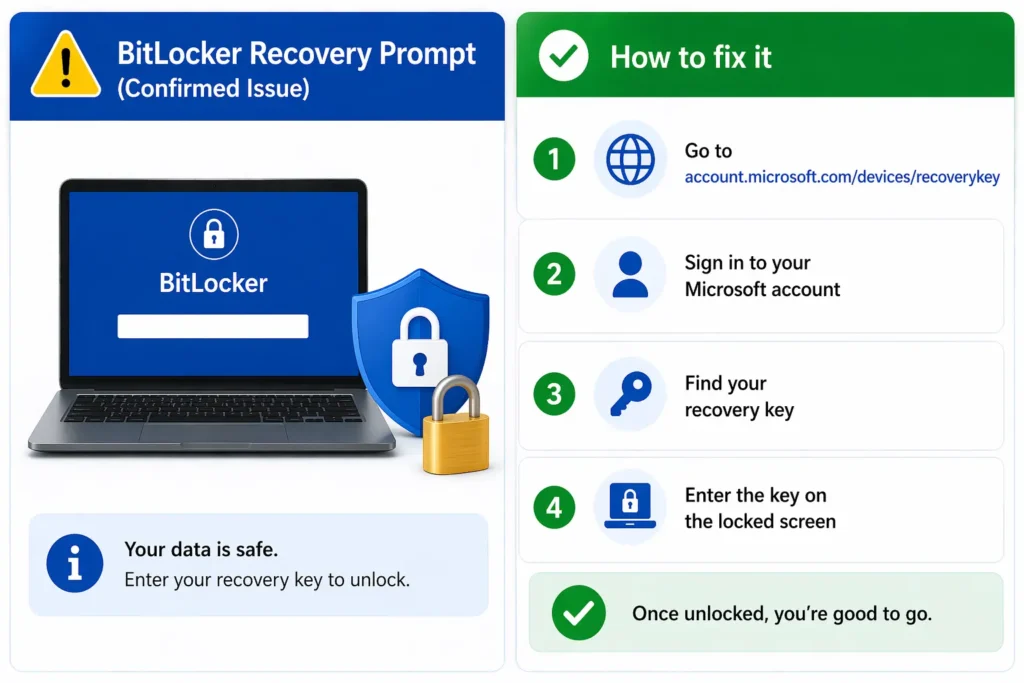
The most widespread issue linked to the KB5083769 update is unexpected BitLocker recovery prompts after restart.
Microsoft has officially acknowledged this problem. It appears to be related to changes in Secure Boot certificates included in the update. On systems with certain BitLocker configurations, Windows may incorrectly detect a security change and require the recovery key before allowing access.
How to fix it
Your data is not lost — you just need to enter your recovery key:
- Visit: https://account.microsoft.com/devices/recoverykey
- Sign in with the Microsoft account linked to your PC
- Locate your 48-digit BitLocker recovery key
- Enter the key on the locked system
Once unlocked, the issue should not repeat on subsequent restarts.
Bug #2: Boot Loop and Graphical Crash Issue (User Reports)
A second issue is being widely reported across community forums, including Reddit and Microsoft’s support pages.
Some users claim that after installing the update, their systems display graphical glitches before crashing into a Blue Screen of Death (BSOD). In certain cases, the system then enters an Automatic Repair cycle and fails repeatedly, resulting in a continuous boot loop.
Based on user feedback, this issue appears to affect specific hardware configurations, including some HP Pavilion laptops and select Dell desktop systems.
Note: This issue has not been officially confirmed by Microsoft at the time of writing.
How to fix it
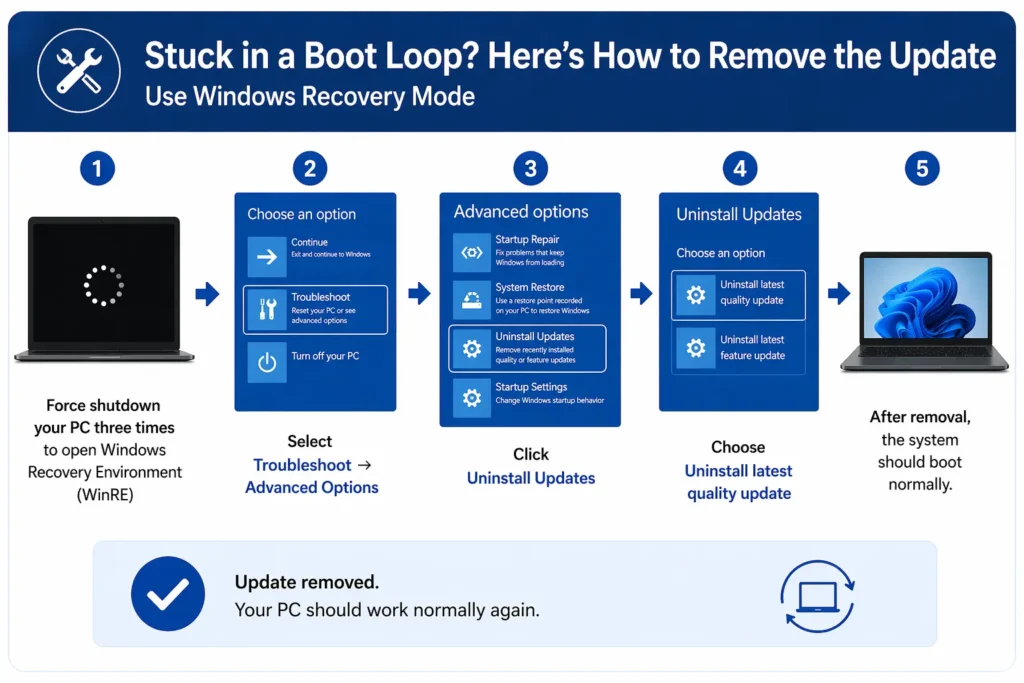
If your system is stuck in a boot loop, you can remove the update via recovery mode:
- Force shutdown your PC three times to trigger Windows Recovery Environment (WinRE)
- Select Troubleshoot → Advanced Options
- Click Uninstall Updates
- Choose Uninstall latest quality update
After removal, the system should boot normally.
What Should You Do Now?
If you have not installed the April 2026 update yet, it may be worth delaying installation until Microsoft releases a fix.
To pause updates:
- Open Settings
- Go to Windows Update
- Click Pause updates
If you need to install the update for security reasons, it is strongly recommended to back up your BitLocker recovery key in advance.
Final Thoughts
The Windows 11 April 2026 update (KB5083769) highlights how even routine security patches can introduce unexpected issues. While Microsoft has acknowledged the BitLocker problem, other reports are still under investigation.
Users experiencing problems should follow the steps above and monitor official updates for a permanent fix.